


So you’ve got this idea. Maybe it’s a small house on your land. Or a shop by the road. Could be a cafe with tables outside. Or just fixing how your yard looks. In your head, it all makes sense. Then someone asks you something basic. Where’s the building gonna go? How much room for cars? Will the sun hit the rooms? Got space to grow later? That’s when it hits you. You need a site plan. Not some fancy inside sketch. Not a full blueprint either. You need something that shows your land. Where stuff sits. Where people walk. Where cars go. Where empty space stays. And you want to see it all before spending cash.
That’s why folks look for free site plan tools. They want to see clearly. No big commitment. They want to test ideas. Move things around. Get how space works. All without monthly fees or hiring pros too soon. This guide shows what site plan software really does. When free tools work great. Which free ones actually help. And how to pick the right one for your project. No big words. No hype. Just real help.
What Site Plan Software Really Is
A site plan shows land from above. Like you’re flying over it. It shows your plot and everything on it. The building shape. Property lines. How far back from the road. The driveway. Parking spots. Walkways. Grass areas. Trees. Water tanks. Septic stuff. Sometimes even when the sun hits and the wind blows.
People mix up site plans and floor plans. Floor plans show rooms inside. Site plans show how buildings sit on land. Both matter. But they fix different problems. Site plan software looks at the outside setup, not inside rooms.
Good site plan tools help you draw land right. Keep sizes correct. Add measurements. Place things with purpose. And save it so others can see. Free tools do most of this pretty well. Especially when you’re just starting out.
When Free Site Plan Software Is Enough
Free tools work best when you’re still playing with ideas. Want to compare different layouts? See how much space you really have? Plan parking and paths? Picture your open areas? Free software handles all that. It’s also great when showing ideas to family. Or contractors. Or architects before going further.
Free tools usually can’t do final permit drawings. Or handle complex slopes and hills. Or meet strict pro standards. But for planning? Talking things through? Making choices? Free tools cover most needs.
Think of free software as your test space. It helps you avoid big mistakes early. Which beats perfect drawings any day.
The Two Main Types of Free Site Plan Tools
Most free tools come in two types. The first type is super easy. Drag and drop stuff. Simple shapes. Quick previews. Great for beginners and fast layouts. But sometimes not super precise.
The second type is more technical. These are CAD tools. Made for exact drawing and measuring. It feels harder at first. But make cleaner, more reliable plans when you need accuracy.
Pick based on what matters more right now. Easy or exact?
SketchUp Free for Visual Thinkers
SketchUp Free is super popular for planning spaces. Why? It lets you see things. Draw your plot. Place a building. Then pull it all into 3D. Now you can see how it really feels. This helps folks who can’t picture scale from flat drawings.
Works great for house plots. Garden layouts. Indoor-outdoor combos. The big library helps too. Quick fences. Trees. Cars. Basic buildings. The downside? Making precise 2D drawings with clean measurements takes more work than CAD tools.
SketchUp Free rocks when seeing space matters more than technical papers.
Sweet Home 3D for Simple and Fast Layouts
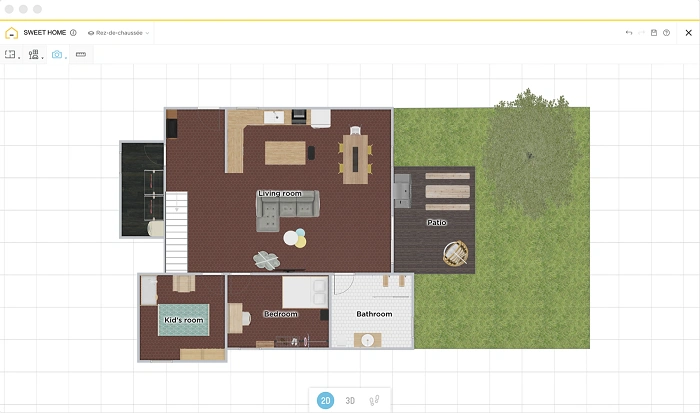
Sweet Home 3D is mostly for inside planning. But it works for basic site plans too. Treat your land like a big floor. Place buildings, paths, and outdoor stuff on it. The software shows instant 3D views. This helps regular folks understand their plan fast.
Best for simple plots. Basic layouts. If your land shape is weird or you need exact boundary control, it might feel limited. Still, for quick planning and early looks, it’s comfy to use.
Browser-Based Planners Like Floorplanner and Planner 5D
Tools like Floorplanner and Planner 5D work in your browser. Easy to start. Often used for floor plans. But many folks use them for site plans too. Just treat the plot like a big open area. These tools make clean visuals fast. Easy to share with links too.
The catch? Free versions often limit export quality. Or lock advanced features. They’re not built just for site planning either. So things like setbacks need manual work. Even so, they help with early planning and showing others.
LibreCAD and QCAD for Accurate 2D Site Plans
Want accuracy? LibreCAD and QCAD’s free version are strong picks. These are real 2D drafting tools. Draw to scale. Add exact measurements. Export clean drawings for printing or sharing with pros.
No 3D views. No visual flash. But you get control and trust. For folks who want proper site plan drawings with real measurements, these free tools often win.
They need some learning. But once you get the basics, they’re powerful and solid.
How to Choose the Right Free Tool
Want the easiest tool to test ideas? Visual planners and browser tools are good starts. Want to see height and volume? How does space feel? SketchUp Free makes sense. Care about clean drawings with exact measurements? CAD tools like LibreCAD work better.
No single best choice exists. The right tool helps you think clearly. Without slowing you down.
A Simple Workflow That Works in Any Software
Start by drawing your property line. Get it right. This is your base. Once that’s set, add setback lines. Or no-build zones if you have them. This shows where you can build.
Next, place your building shape. Don’t worry about the rooms inside. Focus on where it sits. Which way it faces. Space around it. Then plan access. Add driveways. Gates. Parking spots. This step is huge. Many layouts fail because cars can’t move right.
Once access works, add outdoor zones. Gardens. Sitting spots. Storage. Utility areas. Label everything clearly. Add measurements where you can. Finally, save your plan. Look it over calmly. Then share it.
Common Mistakes People Make
One big mistake? Too much detail too soon. People design rooms and furniture before picking where the building sits. Another issue? Ignoring how cars move. This makes driveways and parking impossible.
Many forget about sun direction. Wind patterns. Future growth. Even simple notes prevent regrets. Another mistake? Saving plans without scale or measurements. Makes them hard to trust.
Can Free Software Be Used for Permits
Free tools help make drafts. Clear up ideas. But final permit papers often need pro standards. Local offices usually want specific formats. Scales. Stamps. But using free tools first often saves money. You approach pros with a clearer plan. Less redesign needed.
Final Thoughts
Free site plan software isn’t about avoiding pros. It’s about knowing more before you commit. These tools let you think clearly. Test ideas. Understand space. All before money and materials come in.
Pick a simple planner. Or a visual 3D tool. Or a precise 2D program. The real win is confidence. You stop guessing. Start seeing. And once you have a solid site plan? Every next step gets easier.