


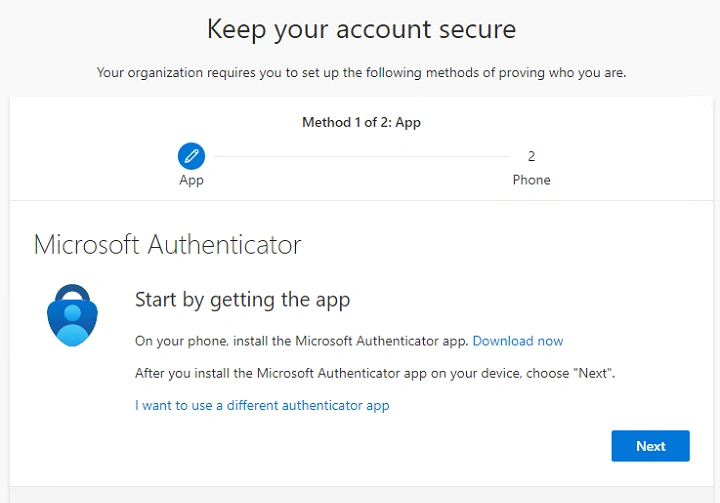
You probably heard of two factor authentication. You log in to a site, type your password, and then it asks for a code from your phone. That little code is often made by something called a software OATH token.
These tokens make your online accounts safer. They stop hackers. They protect your money. They protect your work. They protect your personal info. And the best part? They are simple to use.
If you ever used Google Authenticator, Microsoft Authenticator, Duo, or Authy. Then you already used a software OATH token without even knowing it.
What Is a Software OATH Token
A software OATH token is an app that makes a new login code every few seconds. You use that code to log into your account. It proves that you are the real user.
OATH has nothing to do with the word oath in English. It stands for a set of rules called Open Authentication. It is a standard. Many companies use it. It makes sure all these apps create codes in the same way.
A software token can run on:
- Phones
• Tablets
• Laptops
• Desktops
• Smart watches
You do not need a physical device. The app becomes your token.
Why OATH Tokens Are Safe
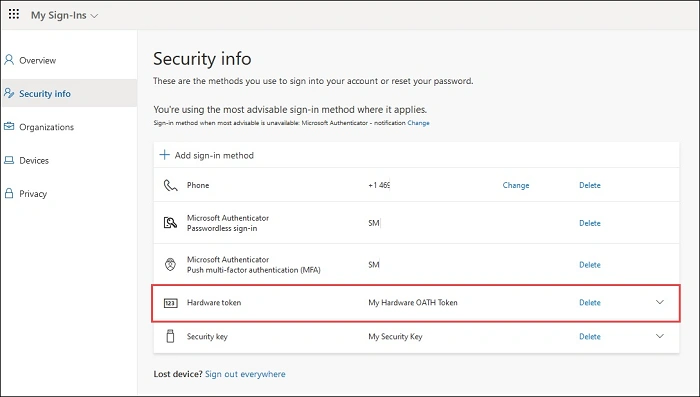
Passwords are easy to steal. People reuse them. Hackers guess them. Phishing scams trick users. Leaks happen.
But OATH tokens add a second lock. Even if someone has your password, they still cannot get in without your code.
Here is why they work:
- Codes change every 30 seconds
• Codes cannot be guessed
• Codes only work one time
• Codes are tied to your device
• Hackers cannot reuse them
• Even a stolen code becomes useless fast
This makes them one of the best safety tools we have today.
How Software OATH Tokens Work in Simple Words
Let’s keep it super simple.
Step 1: You link your account to the token app
Step 2: Your app stores a secret key
Step 3: The app uses time and the secret to make codes
Step 4: You use the code to log in
Step 5: A new code appears every 30 seconds
Even if a hacker watches your code, it expires soon.
There are two main types:
TOTP
Time based One Time Password
Make a new code every 30 seconds.
HOTP
HMAC based One Time Password
Make a new code each time you press a button.
Most apps today use TOTP.
Examples of Software OATH Token Apps
Here are the most common token apps:
- Google Authenticator
• Microsoft Authenticator
• Authy
• Duo Mobile
• LastPass Authenticator
• FreeOTP
• OTP Auth
• 1Password token tool
• Okta Verify
All of them use OATH standards. That means they make codes in the same way.
Where OATH Tokens Are Used
You see them everywhere today.
- Bank accounts
• Email accounts
• Cloud services
• Social media
• Company login
• VPN systems
• Server access
• Coding platforms
• Healthcare tools
• Education accounts
• Developer tools
Basically, anything that needs good security uses OATH tokens.
Why Companies Use OATH Tokens
Companies want safety. They want fast login. They want something easy for users to set up. OATH tokens are perfect.
Here is why companies like them:
- No physical device needed
• Easy to give to employees
• Works on personal phones
• Costs almost nothing
• Supports many platforms
• Trusted by security experts
• Works offline
• Hard for hackers to break
Even big companies like Google and Microsoft use OATH tokens internally.
How to Set Up a Software OATH Token
Setting up the token is simple. Most apps follow the same steps.
Step 1: Install a token app from your app store
Step 2: Log into the website you want to protect
Step 3: Go to security settings
Step 4: Turn on two factor authentication
Step 5: Pick “Authenticator app” or “OATH token”
Step 6: Scan the QR code
Step 7: Enter the code from the app
Step 8: Done
Next time you log in, it will ask for a new code from your token app.
What to Do If You Lose Your Phone
This is the big fear. But do not panic. You have options.
Use backup codes
Most sites give 10 backup login codes. Save them.
Move tokens to a new phone
Apps like Authy, Duo, and 1Password let you move tokens.
Use account recovery
The website may ask for email or SMS confirmation.
Ask your company IT team
If it is a work account, they can reset your token.
To stay safe, always:
- Save backup codes
• Turn on cloud sync if supported
• Keep login recovery emails updated
Benefits of Software OATH Tokens
People love them because they are:
- Fast
• Safe
• Free
• Easy to use
• Hard to hack
• Work offline
• Work on many accounts
• Better than SMS codes
• Better than email codes
SMS codes can be stolen. Email codes can be hacked. But OATH tokens are stronger.
Drawbacks of OATH Tokens
Nothing is perfect. These tokens have small issues.
- Lose your phone and you lose codes
• Some people forget to save backup keys
• Syncing across devices can be tricky
• SMS feels easier for new users
• You need to type numbers often
• Some apps do not support OATH
Still, the benefits are bigger than the problems.
Software OATH Token vs SMS Codes
Here is a quick comparison.
OATH Token
• More secure
• Works without internet
• Codes refresh every 30 seconds
• No SIM card needed
• No mobile signal needed
SMS Codes
• Easy for new users
• Works on all phones
• But can be hacked
• Can be delayed
• Can be stolen with SIM swaps
Security experts prefer OATH tokens every time.
Software OATH Token vs Hardware Token
Hardware tokens are little devices you carry in your pocket. They make codes too.
Hardware Token
• Very secure
• Works offline
• No phone needed
• Hard to attack
Software Token
• No extra device needed
• Always on your phone
• Free
• Easy to set up
• Good for most users
Companies often use hardware tokens for very sensitive work and software tokens for normal users.
Security Tips for OATH Token Users
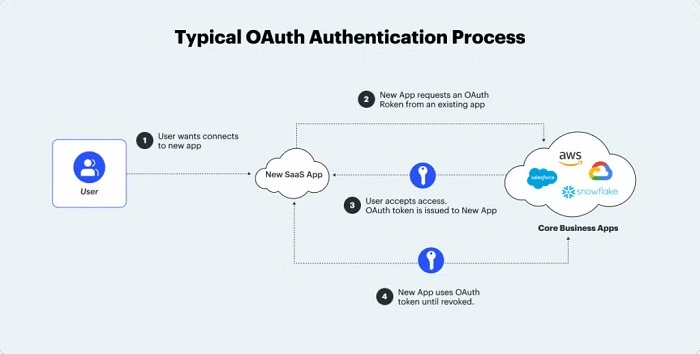
To stay fully safe:
- Do not share your QR code
• Save your backup codes
• Do not screenshot your secret key
• Lock your phone
• Use fingerprint or face ID
• Avoid storing codes in insecure apps
• Use only trusted authenticator apps
• Back up your tokens safely
Little steps protect you from big problems.
Also Read: Visa Software Engineer: Guide to Working at One of the Biggest Payment Tech Companies
Where OATH Tokens Are Going in the Future
Security keeps changing. OATH tokens will become even better.
We will see:
- More apps supporting OATH
• Cloud backup options
• Multi device sync
• Faster setup
• Better recovery tools
• Stronger encryption
• Integration with password managers
• Use with passkeys and biometrics
OATH tokens are not going away. They are becoming even more important.
Why OATH Tokens Matter Today
We live online now. Our money. Our work. Our chats. Our photos. Our identity.
Passwords alone are not enough anymore. Hackers learn fast. Scams get smarter.
OATH tokens give you:
- Control
• Protection
• Peace of mind
• A second lock on your account
Even beginners can use them. No tech knowledge needed.
Software OATH tokens are one of the easiest ways to protect your online life. They add a strong layer of security that passwords alone cannot give.
They are free. Fast. Safe. Trusted everywhere. With just one app, you protect dozens of accounts.
If you care about your privacy, your money, or your personal data, using a software OATH token is one of the smartest choices you can make.