


Developers do not just write code. They need to package it. That means they turn messy project files into a clean, ready to install package. Something users can click once and start using.
Without software packaging, installing apps would be painful. You would need to download folders, move files, set paths, add libraries, install extra tools, and fix endless errors. No one wants that.
Software packaging hides all the hard work. It puts everything into a neat box. Make it safe. Make it easy. Make it fast.
What Is Software Packaging
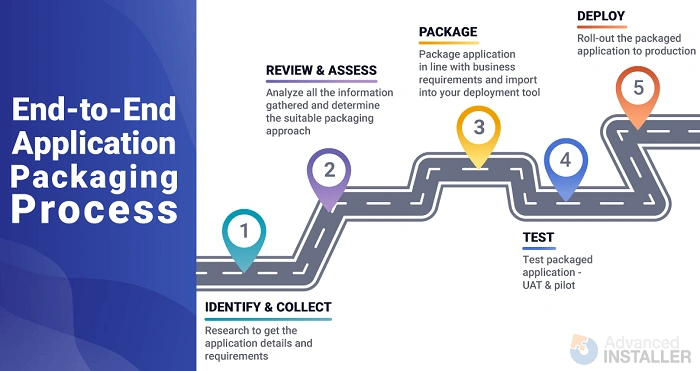
Software packaging is the process of preparing software so people can install it easily. It bundles everything the software needs.
Think of it like packing a suitcase. You gather clothes, shoes, soap, chargers, and put them into one bag. That bag is your package.
A software package includes:
- The app
• Required files
• Libraries
• Icons
• Settings
• Instructions
• Scripts
• Installation tools
You get one clean file. Double click. Install. Done.
Why Software Packaging Matters
Packaging is important because it solves real problems.
Here is why companies and users depend on it:
- Makes installation simple
• Reduces errors
• Keeps software stable
• Helps update apps faster
• Protects files from corruption
• Saves time for IT teams
• Supports many devices
• Helps with security
• Makes software work the same everywhere
Good packaging means fewer headaches for users and fewer support calls for companies.
Types of Software Packages
Different platforms use different package types. Each system has its own format.
Windows Packages
- EXE
• MSI
• APPX
• MSIX
MSI and MSIX are very common in companies.
macOS Packages
- PKG
• DMG
• APP bundles
DMG is the one you often see when downloading Mac apps.
Linux Packages
- DEB
• RPM
• TAR packages
• Snap
• Flatpak
Linux has the most options because different distros use different tools.
Mobile Packages
- APK for Android
• IPA for iOS (through App Store)
These must meet strict security rules.
Container Packages
- Docker images
• Kubernetes packages
These are for servers and cloud apps.
How Software Packaging Works
The idea is simple. Take raw code. Add everything it needs. Build a package. Deliver.
Let’s break it down.
Step 1: Build the software
Developers compile the code.
Step 2: Gather all needed files
Includes:
- DLL files
• Config files
• Assets
• Icons
• Images
• Fonts
• Libraries
Everything needed to run your app.
Step 3: Choose a packaging tool
Tools depend on the platform. Examples:
- WiX
• InstallShield
• Inno Setup
• NSIS
• Advanced Installer
• Debhelper
• RPM tools
• Snapcraft
• Flatpak builder
Step 4: Add installation steps
Like:
- Where to install
• Create shortcuts
• Add registry keys
• Start services
• Enable permissions
Step 5: Add uninstall instructions
A good package can be removed cleanly.
Step 6: Build the final package
One file comes out. That is the installer.
Step 7: Test the package
Make sure to install and uninstall work.
Why Companies Use Software Packaging
Large companies use packaging because they manage thousands of computers. They cannot install apps one by one.
Packaging gives them:
- Control
• Speed
• Standard results
• Fewer support issues
• Better security
• Smooth updates
IT teams package apps and push them across the whole company.
What Makes a Good Software Package
A good package must be:
- Easy to install
• Easy to remove
• Clean
• Stable
• Light
• Safe
• Fast
It must not:
- Break other apps
• Mess up system files
• Slow down computers
• Add unwanted stuff
• Give errors
The cleaner the package, the happier the user.
Common Packaging Tools and What They Do
Here are popular tools and why people use them.
InstallShield
Very powerful. Used by big companies.
WiX Toolset
Free. Uses XML. Good for MSI packages.
Inno Setup
Simple and popular for small apps.
NSIS
Let developers create custom installers.
Advanced Installer
Easy to use. Supports many formats.
Snapcraft
Makes Snap packages for Linux.
Flatpak Builder
For Linux Flatpak apps.
Debhelper
Used for DEB packages on Debian and Ubuntu.
Each tool has its own strength.
Software Packaging in DevOps
Packaging is a big part of modern DevOps.
Here is how:
- Code is written
• Code is built
• Package is created
• Tests run
• Package is deployed automatically
Tools like Jenkins, GitHub Actions, Azure DevOps, and GitLab CI help automate packaging.
Automation means:
- Fewer mistakes
• Faster releases
• Stable results
Packaging becomes part of the pipeline.
Software Packaging in Cloud and Container Platforms
Cloud apps use packaging too.
Containers package:
- Code
• System files
• Dependencies
A Docker image is basically a software package for servers.
Kubernetes uses:
- Helm charts
• YAML packages
These define how apps run in the cloud.
Packaging in cloud systems helps:
- Scale apps
• Deploy fast
• Update safely
• Roll back quickly
Same idea. Just a bigger scale.
How Packaging Helps Developers
Developers use packaging for:
- Version control
• Easy testing
• Sharing software
• Releasing apps
• Updating clients
A packaged app works the same on every device. That saves time and stops weird bugs.
Software Packaging and Security
Packaging improves security because:
- Files cannot be changed
• Digital signatures protect packages
• Installers check for tampering
• Packages use permissions
• Companies can block unsafe software
Signed packages prove the software came from the real developer.
How Packages Are Distributed
There are many ways to deliver packages.
- App Stores
• Websites
• Company servers
• Package managers
• Cloud platforms
• APIs
• Containers
Each method fits different users.
For example:
Windows uses Winget
Mac uses Homebrew
Linux uses APT and YUM
Android uses Play Store
Package managers make installing software even easier.
Challenges in Software Packaging

Packaging can be tricky sometimes.
Common issues:
- Missing libraries
• Broken installers
• Files not copied
• Permission errors
• Wrong version numbers
• Conflicts with other apps
• Hard to update
• Signature errors
That is why testing is important.
Tips for Good Packaging Practice
Want clean packaging? Follow these tips:
- Keep package light
• Add only needed files
• Use version numbers
• Test installation
• Test removal
• Test updates
• Use digital signatures
• Keep logs clean
• Avoid hard coding paths
• Follow platform rules
• Write clear instructions
These make life easier for both developers and users.
Future of Software Packaging
Packaging keeps changing. New trends are coming.
- More cloud packages
• More container based apps
• More automation
• More cross platform packaging
• Better security
• Self healing apps
• Universal package formats
People want faster installs. Cleaner updates. Less hassle.
Packaging will make that possible.
Software packaging is one of the most important parts of software development. It turns raw code into something users can install easily. It makes apps stable. It protects users. It helps companies. It speeds up deployment. It keeps everything organized.
Most users never think about it. But without packaging, installing software would be a mess.
If you want your app to feel professional, packaging is not optional. It is the final step that turns your project into a real product.