


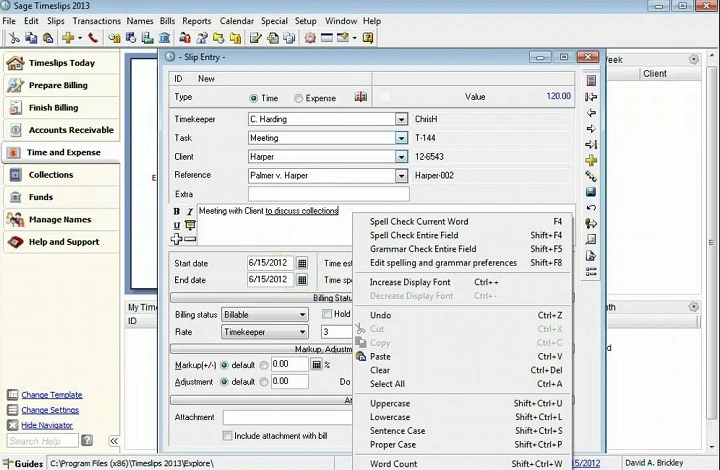
Running a business? You need to track time and money. Every minute counts. Really counts. Even more if you bill by the hour.
But paper? Spreadsheets? That’s slow. And messy. You might forget hours. Lose notes. Send the wrong bill. Not good.
That’s where Timeslips saves the day. It tracks time. Makes bills. Handles clients. All in one place.
Are you a lawyer? Accountant? Work for yourself? Timeslips make life easier. Way easier. Less paperwork. More time for fun work.
What Is Timeslips Software
Timeslips tracks time and makes bills. Simple as that. It helps you record work hours. Create invoices. Track who paid you.
Sage makes it. They’re big. They know business tools.
Law firms love it. So do accountants. Anyone who bills by the hour uses it. You put in hours. Pick a client. Timeslips does the math. Boom! Pro bills that look great.
Use it on your computer. Or in the cloud. Your team can use it anywhere. Everyone stays on the same page.
Who Uses Timeslips
Timeslips works for lots of jobs. Not just one type. Here’s who uses it:
- Lawyers: Track hours for clients and cases
• Accountants: Record time for taxes and audits
• Consultants: Bill by project or hour
• Freelancers: Keep track of each task
• Designers: Track work and send clean bills
Big business? Small business? Doesn’t matter. If you sell time, you need this.
Main Features of Timeslips Software
Timeslips has all you need. Let’s check out the big stuff.
Time Tracking
This is the main thing. Track time is easy. Hit start when you work. Hit stop when done. Timeslips records it all.
Forgot to start? No problem. Add time later. Group time by project. By client. By task type. Whatever works.
Billing and Invoicing
Tracked your time? Now make bills. Timeslips takes your data. Make a clear bill. Add rates. Add taxes. Add discounts.
Make it yours with logos and colors. Send as PDF. Or print it. Clients see what they pay for. You get paid faster.
Expense Tracking
Time’s not all. Track expenses too. Travel costs. Supplies. Other stuff. Add them in. The software puts them on the bill.
No missed costs. Every penny counts.
Client Management
Store client info inside Timeslips. Contact details. Rates. Projects. Payment history. All in one spot.
Got repeat clients? This saves tons of time. Pick the client. Start billing. Done!
Reports and Analytics
Want to know how you’re doing? Check the reports. See what you earned. How much time you billed. Which clients pay most.
Reports show you:
• Time by person or project
• Unbilled time
• Monthly money
• Who paid what
Smart data helps you decide stuff.
Multiple Users and Permissions
Got a team? Everyone can use it. Add users. Set roles. Give permissions. Bosses see all. Workers see their stuff only.
Keeps data safe. Keeps things neat.
Integrations
Timeslips plays nice with other tools. Works with Outlook. Works with QuickBooks. Other business stuff too.
Makes life easy. No copying data around. It all connects.
Cloud and Desktop Options
Pick what works for you. Desktop version for offline work. Cloud version to work anywhere.
Cloud is great for remote teams. Everyone sees fresh data. Right away.
Custom Billing Rates
Every client is different. Some pay more. Timeslips lets you set rates per client. Per project too.
No rate mix-ups. You charge right every time.
Payment Tracking
Send a bill? Track who paid. See who’s late. Know what you’re owed.
Send reminders for late bills. Get paid faster. Keep cash flowing.
Why Businesses Love Timeslips
People love it because it’s simple. It’s strong. It’s right on the money. Here’s why:
- Saves time: No more writing by hand
• Gets bills right: Fewer mistakes
• Looks pro: Clean bills impress clients
• Fits any size: Works for one person or big teams
• You can trust it: Sage makes good stuff
For many folks, Timeslips runs their whole business.
Benefits of Using Timeslips Software
Let’s see the big wins.
- Boosts Productivity
Focus on work. Not paperwork. Record time. Timeslips does the rest.
- Improves Accuracy
Hand billing? Mistakes happen. Timeslips pulls exact numbers. Keep it all right.
- Builds Client Trust
Clear bills make clients happy. They see what they pay for. They trust you more.
- Saves Money
No missed hours. No forgotten costs. You get paid for all your time.
- Grows With You
Business growing? Timeslips grow too. Add users. Add projects. Add clients. No slow downs.
How to Get Started with Timeslips
Getting started is easy. Super easy. Here’s how:
- Go to the Timeslips site
- Pick your version (desktop or cloud)
- Install it or sign up
- Add your company info and logo
- Set up clients and rates
- Start tracking time
Minutes later? You’re ready to bill.
Tips for Getting the Most Out of Timeslips
Want to rock at this? Try these tips:
- Use timers lots: Keeps time exact
• Check reports each week: See where to improve
• Back up your data: Keep records safe
• Make invoices yours: Match your brand
• Use integrations: Link with QuickBooks or Outlook
Small habits. Big results.
Common Problems and Fixes
New users hit small bumps. Here’s how to fix them:
- Forgot the timer? Add time by hand later
• Invoice not showing? Check if entries say “billable”
• System slow? Archive old stuff or get better hardware
• Client not getting bills? Check their email and spam
Learn the basics. Then it runs smoothly.
Timeslips vs Other Billing Tools
Lots of billing tools exist. FreshBooks. QuickBooks Time. Harvest. But Timeslips is special. It’s made for hourly billing pros.
- It tracks complex projects better
• Perfect for firms with many staff and clients
• Handles detailed legal or accounting bills
Others focus on small freelancers. Timeslips works for small teams. And big ones too.
Why It’s Still Popular After All These Years
Timeslips have been around forever. That’s rare for software. Why? It keeps getting better.
Each update adds cool stuff. Cloud access. Faster billing. Better reports. It’s reliable. Tested. Backed by pros who know their stuff.
New tools pop up all the time. But Timeslips stays strong. It focuses on what matters. Being right. Being fast. Being trusted.
Future of Timeslips Software
The future looks bright. Really bright. Sage keeps updating Timeslips. New tech. Cloud syncing. Better security.
AI features are coming. Think of automatic billing tips. Smart reminders. Real-time insights. Cool stuff!
Timeslips will keep growing. Keep meeting what pros need. Everywhere.
Timeslips is one of the best time and billing tools. It’s trusted. Proven. Easy to use. Lawyer? Accountant? Consultant? Work alone? It saves time. Cuts stress.
No more manual records. No missed hours. Just simple, pro billing. It helps your business grow.
Want to track less and earn more? Try Timeslips. It’s smart. It’s reliable. It makes work life easier.