


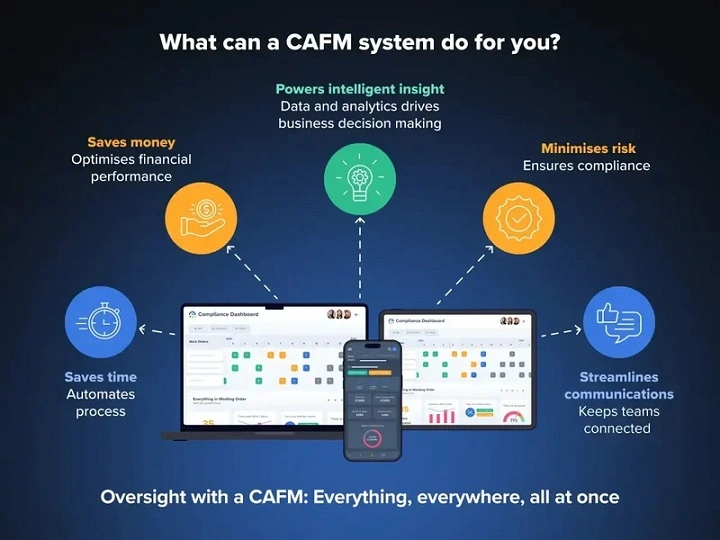
Picture a big office. Or maybe a hospital. Even a mall works.
Lights need to work. AC has to run. Lifts must be safe. Rooms need cleaning. You track stuff. Bills come in. People walk around all day.
Now think about doing all that with paper. Plus Excel sheets. Phone calls too. And those little sticky notes.
Gets messy fast, right? You miss things. Money goes up. Small stuff turns big.
That’s why CAFM software exists.
CAFM means Computer-Aided Facility Management. Big words, I know. It’s just a computer system. It helps you manage buildings. All in one spot.
This guide explains CAFM simply. No tech talk. No sales stuff. Just clear facts about what it is. How it works, why you’d care.
What Is CAFM Software?
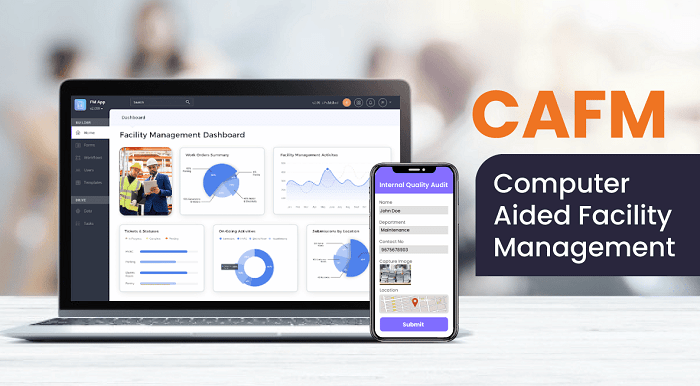
CAFM software helps manage buildings. And all the stuff inside them. Buildings, rooms, machines, power, services – everything.
With CAFM, you can track floor plans. See who uses what room. Plan when to fix things. Watch your equipment. Handle repair requests. Control costs. Keep records neat.
You don’t wait for stuff to break. CAFM helps you plan ahead. Stay in control. Simply put? It makes messy building work neat and tidy.
Why CAFM Software Exists
Buildings cost a lot of money. Building them? Pricey. Running them? Even more.
Power bills. Water. Cleaning crews. Fixes. Safety checks. Worker pay. Updates. It all adds up fast.
Without a good system? You just react. Something breaks. No one knows its past. Repairs take ages. Costs go up. Work slows. People get mad.
CAFM stops this mess. It shows what you own. Where it sits. How it’s doing. What needs help. This view saves time. Cuts waste. Reduces stress.
Who Uses CAFM Software?
Lots of people use CAFM. In many places too.
Building bosses use it daily. Fix-it teams get work orders through it. Office folks use it for desks and meeting rooms.
Hospitals track key gear with it. And patient rooms. Safety stuff too. Schools use it for classrooms. Labs. Dorms. Factories watch machines with it. Airports use it. Malls too. Hotels. Data centers. Government buildings.
Got buildings? Got stuff to manage? CAFM helps.
Core Features of CAFM Software
Space management comes first. It shows how you use space. Floor plans. Room sizes. Desk spots. How full things are. All in one view. This helps you see if space works well. Or gets wasted.
Next up? Maintenance management. Make work orders. Give out tasks. Set what’s urgent. Track progress. Plan fixes before breaks happen. Saves money. Stop downtime.
Asset management matters too. Assets? That’s machines, desks, tools, computers, trucks. The system tracks where they are. Their shape. Warranty info. Service past. Value. Makes planning fixes easier.
Work orders stay neat too. Something breaks? Log it. Assign it. Track it. Close it. All in one place. Nothing gets lost.
CAFM tracks money too. Fix costs. Power use. Contracts. Vendor bills. See where money goes. Find savings.
Health and safety? Big deal. CAFM tracks checks. Papers. Safety tests. Super important for hospitals. Factories. Public spots.
How CAFM Software Works in Real Life
Let’s say the office AC makes noise. Someone reported it to CAFM. The system logs it. Send it to the fix team.
The tech checks the system. See recent service info. Just a loose part! They fix it quickly. Log the repair. Note the cost. Done.
No panic. No delays. No wasted money. Do this for lots of issues? You see CAFM’s value fast.
CAFM vs CMMS
People mix up CAFM and CMMS. CMMS? That’s the Computerized Maintenance Management System. Another big term!
Here’s the difference. CMMS just does maintenance. And assets. CAFM does that too. But also space. Buildings. People. Planning.
CMMS = maintenance only. CAFM = whole building. Some systems do both. But CAFM sees more.
CAFM vs IWMS
IWMS is another term. Means Integrated Workplace Management System. Even bigger words!
IWMS systems are huge. Complex too. They do CAFM stuff. Plus leases. Green tracking. HR stuff. Fancy reports.
CAFM is simpler. Easier to start. Small companies like CAFM first. Only go IWMS when they grow big.
Benefits of Using CAFM Software
Use CAFM right? Good things happen. Buildings run smoothly. You fix before breaks. Less downtime. Costs you can predict. Space used better.
Teams work better. Everyone sees the same info. Compliance gets easier. You track all checks. Workers face less mess. They work better. Feel better.
Over time? You make smart choices. Based on facts. No guesses.
Challenges of CAFM Software
CAFM is strong. But not magic. There are bumps.
Setup takes time. Entering all that data? Work. Staff need training. Some hate change. Bad setup? Less benefits. Don’t use it daily? Won’t help much.
Success needs good planning. Real expectations. CAFM works when it’s part of daily work. Not just sitting there.
Implementation Timeline
How long to set up? Depends on size. Small offices? A few weeks maybe. Big hospitals? Could be months.
Most time goes to data. Getting it. Cleaning it. Once live? It gets better. As you add more info. Refine how you work.
Cost Considerations
CAFM costs vary. A lot. Some charge per user. Others per building. Or asset count. Cloud systems? Lower start cost. On-site? More upfront. But more control.
Real value? The payback. Less breaks. Better power use. Smart space use. Fewer emergencies. Often worth the price.
Skills and Career Value
Using CAFM? Not hard. Basic computer skills help. Know buildings? Or maintenance? You’re set.
CAFM skills matter. For careers too. Building managers need it. Maintenance planners too. Operations folks benefit. Buildings get complex. Data matters more. CAFM knowledge? Growing demand.
CAFM isn’t about fancy screens. Or complex tech. It’s about control. Clarity. Keeping buildings running smooth.
Less chaos. Better planning. Stay ahead of problems. Don’t just react.
Work with buildings? Maintenance? Operations? CAFM is worth knowing. When buildings run well? Everything else gets easier. You know?