


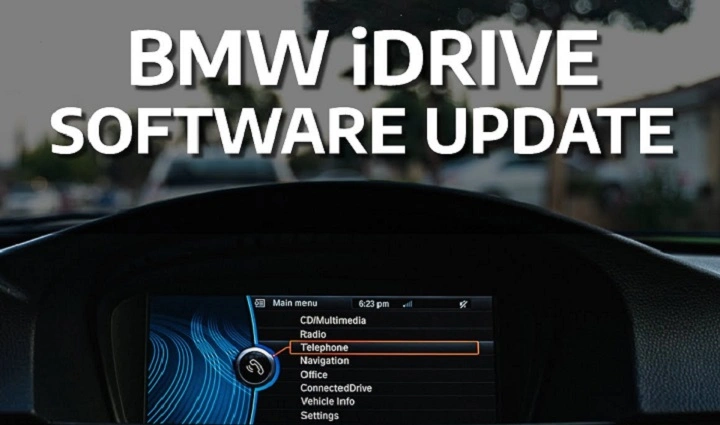
BMW cars feel different, right? Smooth drive. Smart screens. Clear maps. Cool features. And that luxury feeling. But here’s something people forget.
Your BMW is not just a car. It is also a computer. A big one.
Just like your phone needs updates, your BMW needs updates too. These updates fix problems, add features, improve safety, and make the whole car feel newer. Skip them? The car may feel slow. Maps get old. Some features may not work right.
Think of BMW software updates like giving your car a refresh. It keeps everything sharp. Clean. Fast. Modern.
Let’s look at what BMW updates are, why they matter, what they include, and how you can get them easily.
What Is a BMW Software Update?
A BMW software update is a package that improves the digital side of your car. The system in charge of this is often called iDrive or BMW Operating System. BMW updates:
- The infotainment system
• The maps
• The Bluetooth and phone features
• Car communication systems
• Engine and battery control on some models
• Parking cameras and sensors
• Driver assistance features
• Wireless features
• Connection with the BMW mobile app
The cool part? Some updates come over WiFi or mobile data. Some need a service visit. But all updates help your BMW run better.
Two types of updates exist.
Small updates
These fix bugs. Improve stability. Make things smoother. Give tiny new features. Install fast.
Big updates
These upgrade your BMW system to a new version. They change:
- The layout
• The features
• The maps
• The voice system
• The phone connection
They are like going from an older iPhone model to a newer software version. The car feels new again.
Why BMW Software Updates Matter
Updates do a lot more than people think. Here’s why you should never ignore them.
They fix bugs
Cameras acting weird? Maps lagging? Audio cutting out? Bluetooth dropping calls?
Updates fix all this.
They protect the car
Cars today connect to phones, apps, and networks. BMW updates close security holes before bad people can use them.
Safety matters more in a car than in any device.
They improve performance
- Faster menus
• Faster touchscreen
• Better voice commands
• Faster map loading
• Better connection with your phone
Your whole system feels smoother.
They make the car future friendly
BMW keeps adding new features like:
- Digital Key
• Enhanced CarPlay
• Better camera views
• More driving data
• Parking improvements
• Remote start features
Updates add these even to older models.
They update navigation maps
Old maps mean wrong turns. Road changes. Missing streets. BMW map updates fix this.
They improve wireless features
Most BMWs now use wireless CarPlay or Android Auto. Updates improve:
- Connection
• Audio quality
• Touch response
• Stability
They help electric BMWs
Electric models like i4, i7, or iX get updates that improve:
- Battery management
• Range accuracy
• Charging speed
• Power delivery
This is a big deal.
What Comes in a BMW Software Update?
Each update is different. But they often include:
- Map updates
• Camera fixes
• Audio system improvements
• Bluetooth stability
• App connection fixes
• Voice control updates
• Parking sensor improvements
• Lighting system tweaks
• Driving assistance fixes
• New phone compatibility
• CarPlay improvements
• Small performance updates
• New animations
• Better touch response
• Faster menus
Big updates can add:
- New iDrive layouts
• New shortcut buttons
• New widgets
• New sounds
• New color themes
• Updated climate controls
• New BMW ConnectedDrive functions
BMW adds more features even after you buy the car. That is the beauty of digital cars.
How to Check for a BMW Software Update

Checking is easy. You can do it in two ways.
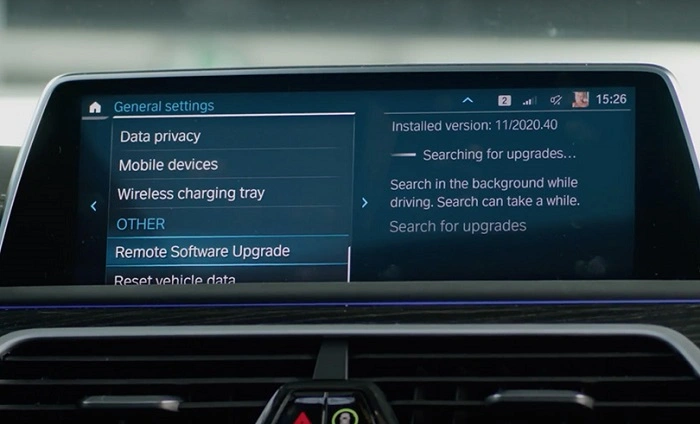
Method 1: In your car
- Sit in your BMW
- Go to Settings
- Pick General Settings
- Select Remote Software Upgrade
- Hit Check for update
If there is one, the car will tell you.
Method 2: Using the BMW app
- Open My BMW app
- Go to Remote Software Upgrade
- See if updates are ready
You can even download the update on your phone and send it to your car later.
How to Install a BMW Software Update
Installing is simple. Just follow these steps.
Step 1: Park your car
The car must be off the road.
Step 2: Keep the car locked
BMW installs updates only when the car is locked.
Step 3: Keep enough battery
If the battery is low, the update will not start.
Step 4: Use WiFi or mobile data
Your BMW may need a stable connection.
Step 5: Start installation
The car may:
- Restart the system
• Turn screens off
• Turn them on again
This is normal.
Step 6: Wait
Small updates take 10 to 15 minutes.
Large updates take 20 to 40 minutes.
The car must stay locked. Do not get inside.
What Problems Do Updates Fix?
Updates solve common issues like:
- Slow screen
• Wrong map routes
• Bluetooth drops
• Lag during CarPlay
• Audio glitches
• Bugs with parking sensors
• Wrong fuel range reading
• Slow voice assistant
• Camera blackouts
• Phone not connecting
• Touchscreen freezing
• Navigation errors
Many BMW owners say their car feels brand new after updates.
Problems You Might See After Updating
Sometimes small issues happen:
- Bluetooth needs reconnecting
• Some apps need re-login
• CarPlay needs reconnect
• Settings may reset
• Radio presets may change
Easy fixes.
If something serious happens:
- Restart the car
• Reset iDrive
• Update your phone
• Reinstall BMW app
Most issues fix themselves after one or two restarts.
Should You Use Automatic Updates?
Most people should.
Automatic updates:
- Install at night
• Save time
• Keep your car safe
• Keep features fresh
If you prefer control, you can turn them off.
How Often Do Updates Come?
BMW releases updates:
- Every few months
• With major updates yearly
• Map updates a few times each year
Electric BMWs may get more frequent updates.
Do All BMW Models Get Updates?
Most BMWs made after 2018 get updates. Especially if they use:
- iDrive 7
• iDrive 8
• BMW Operating System 8.5
Older models may need USB updates from the dealer.
What You Should Update Besides Software
- BMW maps
• BMW ConnectedDrive
• BMW mobile app
• Digital Key settings
• Bluetooth devices
• Phone software
When all match, everything works better.
Should You Update Right Away or Wait?

Update right away if:
- Your system is slow
• You use CarPlay a lot
• You have a new iPhone
• You want more safety
• You want the latest features
Wait a bit if:
- Your car uses sensitive fleet systems
• You use custom coding
• You want others to test it first
Most people update within a week.
Tips to Make BMW Updates Smooth
- Keep your battery charged
• Park with WiFi nearby
• Update your phone too
• Don’t open the car while updating
• Restart your car after big updates
• Reconnect Bluetooth if needed
• Recheck your settings
These make everything smooth.
The Future of BMW Software Updates
BMW is working on:
- Faster wireless updates
• More AI features
• Smarter voice assistant
• Better EV battery tools
• New entertainment features
• Cloud based car settings
• More CarPlay functions
• Better safety alerts
The car will feel more like a smart device each year.
BMW software updates are one of the easiest ways to keep your car sharp and modern. They fix bugs, add features, improve speed, help your phone connect better, and make the whole experience smoother.
Want your BMW to feel new even after years?
Update often.
Want safer driving?
Update often.
Want better maps and features?
Update often.
Your BMW gives you comfort, power, and smart tech every day. Keeping it updated keeps everything working right.
Updating your BMW is simple. Fast. Free. And worth it.
If you want your BMW to stay at its best, keep the software fresh. Your car will thank you.