


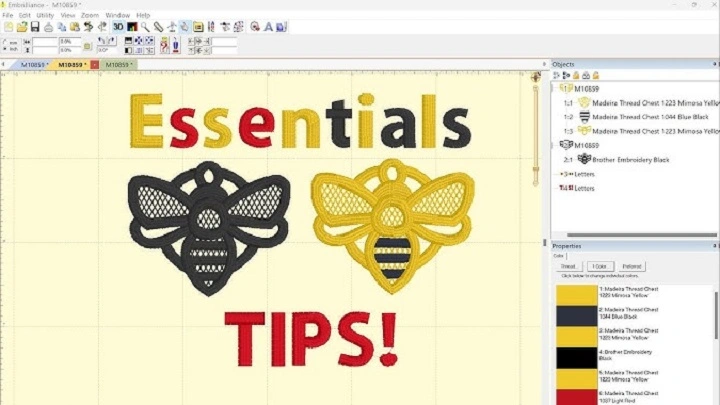
Embroidery is fun. It makes clothes pretty. It turns simple fabric into something special. A name on a towel. A flower on a shirt. A cute design on a baby blanket. But doing embroidery by hand takes time. And using a fancy machine is not enough. You need good software to make designs easy.
That’s where Embrilliance software comes in. It is simple. Friendly. Works on both Windows and Mac. People love it because it is not confusing like many other embroidery tools. You can edit designs. Add text. Change colors. Merge patterns. Fix stitches. All without stress.
If you want to create embroidery designs without feeling lost, Embrilliance is perfect for you. It is made for beginners. But pros use it too. It grows with you as your skills get better.
What Is Embrilliance Software?
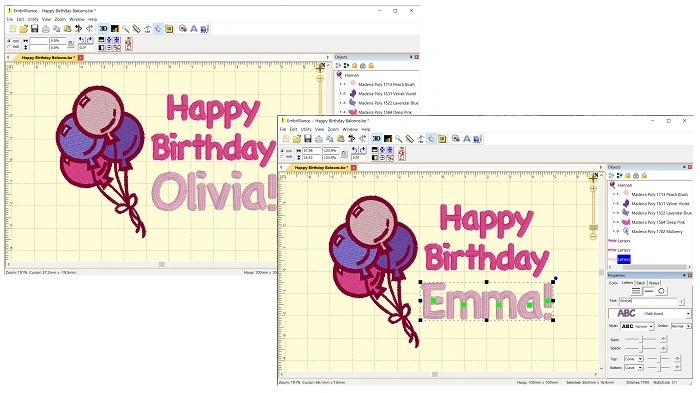
It is embroidery software used to edit, create, and manage stitch designs. You can use it for home projects, small businesses, or just for fun. It works with many brands of sewing and embroidery machines.
Embrilliance comes as different modules. Each one does something special. You pick what you need. You do not need to buy everything at once.
Popular Embrilliance modules:
• Essentials
• Enthusiast
• StitchArtist
• Density Repair Kit
• Thumbnailer
Each one adds more tools. But you can start small and grow later.
The main goal of Embrilliance is simple. To make embroidery easy for everyone.
Who Uses Embrilliance?
Embrilliance is used by all kinds of people:
• Hobby stitchers
• Home sewers
• Quilters
• Craft makers
• Small embroidery shops
• Etsy sellers
• Teachers
• Designers
• Gift makers
If you love adding designs to fabric, Embrilliance helps you do it better. Beginners love it because it is simple. Experts love it because it is powerful.
Why People Love Embrilliance
People choose Embrilliance for many reasons. Here are the biggest ones:
- Works on Mac and Windows
• Easy to learn
• No complex screens
• Affordable modules
• No heavy computer needed
• Saves in many machine formats
• Fast tools
• Lots of tutorials
• Big online community
Many embroidery programs only work on Windows. But Embrilliance works smoothly on Mac too. That is a huge win for people who sew and love Apple computers.
Main Features of Embrilliance Software
Embrilliance has many tools. Each one helps with a different part of embroidery. Let us look at the most useful features.
Essentials: The Core Features
1. Edit Designs Fast
You can resize, rotate, flip, and move designs anywhere. Want a design bigger? Smaller? Tilted? Easy.
2. Add Text
You can add:
• Names
• Monograms
• Phrases
• Quotes
There are many fonts built in. Plus, you can use BX fonts. These are popular because you can type them like normal text.
3. Merge Designs
Want to mix two designs together? Just drag and drop. Embrilliance makes it simple to combine patterns.
4. Change Colors
Pick any thread brand. Then change colors to match your real thread. Helps your final design look right.
5. Remove Jumps and Clean Up
The software reduces jump stitches. That means less trimming when you sew.
6. Save in Many Formats
Embrilliance exports to many machine formats:
• Brother PES
• Janome JEF
• Bernina EXP
• Singer XXX
• VP3
• DST
And plenty more.
Enthusiast: Extra Power Tools
If you want more features, Enthusiast gives you fun extras.
1. Knockdown Stitch
Great for fuzzy fabric. It flattens the base so your design stays sharp.
2. Multi Hooping
For big designs that do not fit in one hoop. Embrilliance splits them automatically.
3. Stitch Editing
Fix problem areas. Delete stitches. Add stitches. Change stitch directions.
4. Precise Position Tools
Perfect for detailed work and big projects.
StitchArtist: Create Designs from Scratch

If you want to draw your own embroidery, StitchArtist is for you.
You can:
- Make original patterns
• Digitize art
• Create applique
• Add fills and satin lines
• Shape your own stitches
StitchArtist has levels. Each one adds more tools. Start simple. Move up when you are ready.
Density Repair Kit
This tool fixes heavy designs. Some patterns have too many stitches. Your machine struggles. Fabric puckers. DRK cleans up the design so it sews smoothly.
Thumbnailer
This small tool shows embroidery designs as pictures instead of blank icons. Makes searching files much easier.
How Embrilliance Helps You Make Better Designs
Here is how Embrilliance makes your sewing life easier.
1. You See Everything Before Sewing
You can preview stitches. Colors. Layers. Mistakes show up early.
2. You Make Fewer Errors
Fix spelling. Fix size. Fix spacing. Everything before touching fabric.
3. You Waste Less Thread
Clean designs. Correct density. Right colors.
4. You Sew Faster
Because your designs are prepared well.
5. You Make Professional Designs
Even at home, your work looks neat and high quality.
What File Types Does Embrilliance Support?
Embrilliance reads and saves many embroidery formats. These include:
- PES
• JEF
• VIP
• VP3
• EXP
• DST
• XXX
• HUS
• SHV
• PEC
How to Use It Step by Step
Starting is easy. Let me show you.
Step 1: Install the software
Download it from the Embrilliance website. Works on Mac and Windows.
Step 2: Open your design
Drag and drop a file into the window.
Step 3: Edit the size
Set the width and height. Make sure it fits your hoop.
Step 4: Add text
Pick a BX font. Type your name or message. Place it where you want.
Step 5: Change colors
Match your thread brand. Helps when stitching later.
Step 6: Clean jumps
Use the tools to reduce unnecessary stitches.
Step 7: Save in your machine format
Pick the right file and export it.
Step 8: Send to your machine
Use USB, cable, or Wi-Fi depending on your model.
That is it. Simple and clear.
Common Problems and Fixes
Sometimes small problems happen. Here are quick solutions.
Problem: Text looks weird
Fix: Change stitch type or adjust density.
Problem: Machine says file not supported
Fix: Save in the correct format like PES or JEF.
Problem: Design stitches too tight
Fix: Use Density Repair Kit.
Problem: Colors look wrong
Fix: Change thread brand in settings.
Problem: Letters too small
Fix: Increase size so stitches stay clean.
Most issues are simple to fix.
Embrilliance vs Other Embroidery Software
Here is why Embrilliance stands out.
Embrilliance:
• Easy to use
• Works on Mac
• Affordable
• Modular system
• Good for beginners
• Powerful for pros
• Big community
Other programs:
• Hard to learn
• Expensive
• Windows only
• Too many tools new users do not need
Embrilliance hits the sweet spot.
Tips for Using Embrilliance Like a Pro

Want better results? Try these tips.
- Start with Essentials
• Learn one tool at a time
• Use BX fonts
• Test designs on scrap fabric
• Keep your thread list updated
• Save different versions of a design
• Join Facebook groups for Embrilliance users
• Watch tutorials on YouTube
Small habits lead to great results.
What You Can Make with Embrilliance
Here are fun project ideas.
- Baby blankets
• Name patches
• Dog bandanas
• Wedding gifts
• Holiday designs
• Shirt logos
• Quilting blocks
• Kitchen towels
• Tote bags
• Birthday gifts
You can make endless things. Just use your imagination.
Future of Embrilliance Software
Embrilliance keeps growing. Future updates may include:
- More stitch types
• Faster editing
• Extra fonts
• New fill styles
• Smarter density tools
• Better cloud options
The creators keep improving it. Users get updates for free.
Embrilliance software is one of the best embroidery tools you can use. It is simple. Clear. Powerful. Perfect for beginners and perfect for growing into expert work. You can edit designs, add text, make new patterns, clean up stitches, fix density, and send perfect files to your machine.
If you want embroidery that looks clean and professional without feeling overwhelmed. Then it is a great choice. It makes design fun, easy, creative, and stress free.