



Got a Mac? You know how nice it feels. Smooth. Fast. Easy. That’s why we love them, right? But here’s the thing. You gotta keep it fresh. How? Updates.
Think of Mac updates like vitamins for your computer. They fix bugs. Stop hackers. Add cool stuff. Make things faster. Skip them? Your Mac gets slow. Apps crash. Sites won’t load. Bad guys find ways in. Not good.
You know how cars need oil changes? Same deal. Skip too many and… yikes.
So let’s break it down. What are these updates? Why care? How do you get them? What breaks do they fix? And how can you make it all easy? I’ll explain it simply.
What Is a Mac Software Update?
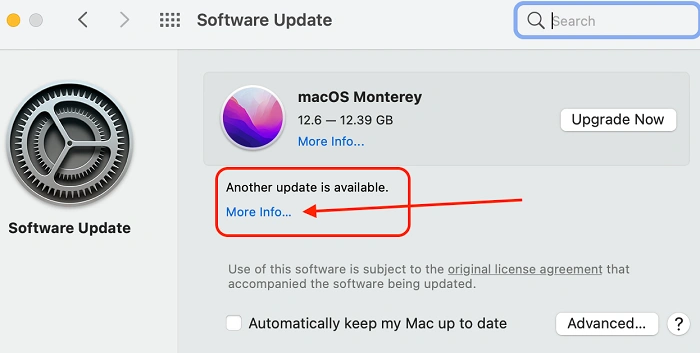
A Mac update is like a gift from Apple. It makes your computer better. Updates macOS – that’s the brain of your Mac. Plus apps like Safari, Mail, and Photos.
What’s inside an update?
- Bug fixes
• New stuff
• Safety patches
• App upgrades
• Speed boosts
• Battery help
• New looks
• Crash fixes
Two types exist.
Big updates
These come once a year. New macOS versions. Like:
- macOS Ventura
• macOS Sonoma
• macOS Monterey
Big changes. New looks. New tools.
Small updates
These pop up often. Fix little things. Close safety holes. Make stuff stable.
Both help. Both matter.
Why Mac Software Updates Matter So Much
Look, I get it. “Remind me later” is easy to click. For weeks. Maybe months. But updates do more than you think.
They fix bugs
Every macOS has quirks. Apps crash? Wi-Fi acts weird? Mac freezes? Updates fix these. Your Mac runs better after.
They protect your stuff
Bad guys hunt for weak spots. Apple finds them first. Patches them. Skip updates? You’re an easy target.
They give you free stuff
New features. Fresh design. Better tools. Cool shortcuts. Even new emojis.
All free. Just update.
They speed things up
Updates kill slowdowns. Help battery life. Boost speed. Old Macs feel new again.
Apps need them
Some apps quit working on old macOS. Updates keep things working right.
They help Macs last
Updated Macs stay healthy. For years and years.
How to Check for Mac Software Updates
Super easy to check.
- Click the Apple logo
• Pick System Settings
• Hit General
• Hit Software Update
Your Mac looks for updates. Found one? You’ll see “Update Now”.
Click it. Done!
How to Install Mac Software Updates
Installing is simple. But know these things.
Step 1: Plug in power
Step 2: Check your space
Step 3: Close big apps
Step 4: Hit Install
Step 5: Wait
The screen goes black. Restarts twice. Normal.
That’s it. Updated.
How Long Do Updates Take?
Small ones: 5 to 20 minutes
Big ones: 30 minutes to 2 hours
Slow internet? It takes longer.
What Problems Do Mac Software Updates Fix?
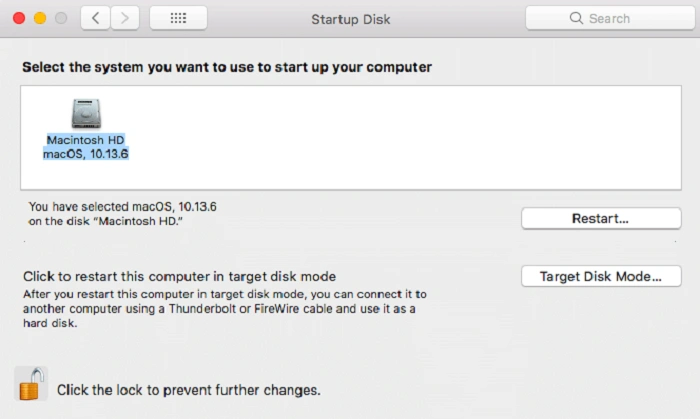
Updates fix tons of stuff. Like:
- App crashes
• Slow Mac
• Battery drain
• Wi-Fi issues
• Safety holes
• Bluetooth issues
• File errors
• Overheating
Why Some People Fear Updates
People worry:
- Apps might break
• Mac might slow down
• Update might fail
• Files might disappear
Truth is:
- Apple tests a lot
• Problems are rare
• You can backup first
• You can go back if needed
Updates help far more than they hurt.
Problems You Might See After Updating
Sometimes small things happen.
Mac feels slow
Fix: Restart twice.
Battery drains
Fix: Wait a day.
Apps don’t work
Fix: Update the app.
Bluetooth cuts out
Fix: Turn off and on.
Wi-Fi breaks
Fix: Forget network, reconnect.
Update stuck
Fix: Restart and try again.
Should You Turn on Automatic Updates?
Most people should. It makes life easy.
- Open System Settings
• Hit General
• Pick Software Update
• Turn on automatic
Your Mac will update apps, safety patches, and macOS on its own.
How Often Do Mac Updates Come Out?
- Big update yearly
• Safety updates every few weeks
• App updates anytime
• Safari updates often
Do Older Macs Still Get Updates?
Yes, but not forever.
The new macOS works on Macs from the last 7 to 8 years. Older ones may stop getting full updates but sometimes still get safety patches.
Tips to Make Mac Updates Smooth
- Make space
• Backup before big updates
• Keep plugged in
• Restart weekly
• Update apps too
• Keep internet stable
What You Should Update Besides macOS
- App Store apps
• Safari
• Printer drivers
• Any pro apps you use
Should You Update Right Away or Wait?
Update now if you want:
- Safety
• Speed
• New features
Wait a week if you use sensitive apps or want others to test first.
Common Myths About Mac Updates
Myth: Updates slow Macs
Truth: They speed them up
Myth: Updates cause bugs
Truth: They fix bugs
Myth: You’ll lose files
Truth: Files stay safe
Myth: You don’t need updates
Truth: You really do
The Future of Mac Software Updates
Apple is working on:
- Faster installs
• Smarter AI features
• Better battery life
• Stronger safety
• Cloud tools
Your Mac stays modern for years.
Mac updates are the best thing you can do for your computer. They make everything better. Faster. Safer. Cleaner. More stable.
Want your Mac to last? Update often.
Want smooth apps? Update often.
Want to stay safe? Update often.
Your Mac helps you every day. So keep it updated. It’s the easiest win ever.