


Your PS4 worked fine yesterday. Today? Dead. Maybe it’s stuck on the logo. Or looping. Black screen. Error messages about bad files. You restart. Unplug stuff. Wait. Try again. Nothing. Feels like it’s toast, right?
Here’s the thing. Your PS4 isn’t broken. Not really. It just needs fresh software. Like, a clean start.
Reinstalling PS4 software sounds scary. But it’s not. Think of it like this. Your console gets a new brain. Wipes out bad files. Put in good ones from Sony. Fixes loops. Failed updates. Crashes that won’t stop.
This guide? Super simple. I’ll tell you what reinstalling means. When to do it. What you need. Every step. Common mess-ups. What if it fails? No tech talk. Just help.
What Reinstalling PS4 System Software Actually Means
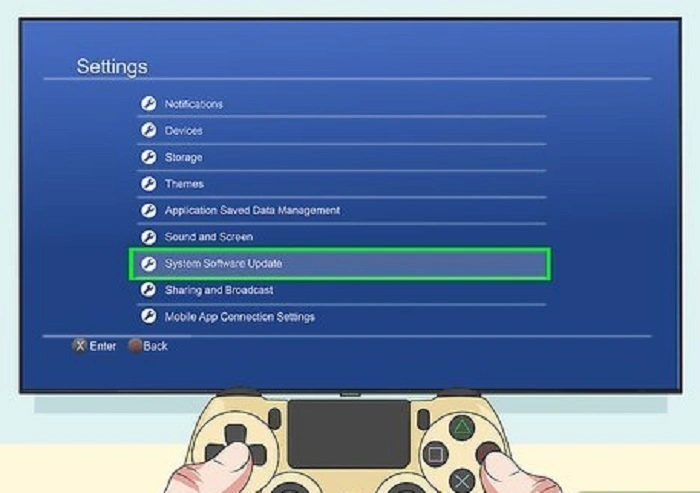
Reinstalling means this. Delete the PS4’s brain. Put in a fresh one. Not like normal updates. Updates fix bugs. Keep your stuff. Reinstalling? Wipe it all. Start over.
Your PS4 has bad files? Updates fail over and over? Reinstalling kills those bad files. Gone. It’s the deepest fix you can do. Before you pay for repairs.
When You Should Reinstall System Software
Don’t reinstall small stuff. Does the PS4 still work? Try restarting first. Or rebuild the database. Update normally. Reinstalling is for big problems. The ones that won’t quit.
Use it when your PS4 is stuck on the logo. Shows “Cannot start PS4.” Updates fail every time. Keep restarting. Black screen after updates. Can’t reach the home screen? Yeah, time to reinstall.
Important Warning About Data Loss
Listen up. This matters. Reinstalling deletes everything. Games. Saves. Screenshots. Videos. User stuff. All gone. Like new from the store.
Does the PS4 still work sometimes? Back up now. USB drive. External drive. PlayStation Plus cloud. PS4 won’t boot? Sorry. No way to save data. You pick. Lose data or lose the PS4.
What You Need Before Starting
Get your stuff ready. You need a USB drive. At least 8GB. A computer with internet. Working PS4 controller. USB cable for the controller. USB must be formatted right. Or PS4 won’t see it.
Get this right. Most failures happen here.
Preparing the USB Drive Correctly
Plug USB into the computer. Format as FAT32 or exFAT. Not NTFS. PS4 can’t read that. Make a folder called PS4. Inside, make an update. Both in CAPS.
Download the full reinstall file. Not the small update. The big one. About 1GB. Name it PS4UPDATE.PUP exactly. Put it in the Update folder. Goes like this: USB, then PS4, then update, then file. One typo? PS4 won’t find it.
How to Enter PS4 Safe Mode
Safe Mode is PS4’s fix-it menu. Turn the console off. Hold the power button. Wait for a second beep. It takes like seven seconds. Let go. Connect controller with USB cable. Press the PS button.
Didn’t work? Try again. That second beep timing is key.
Choosing the Correct Safe Mode Option
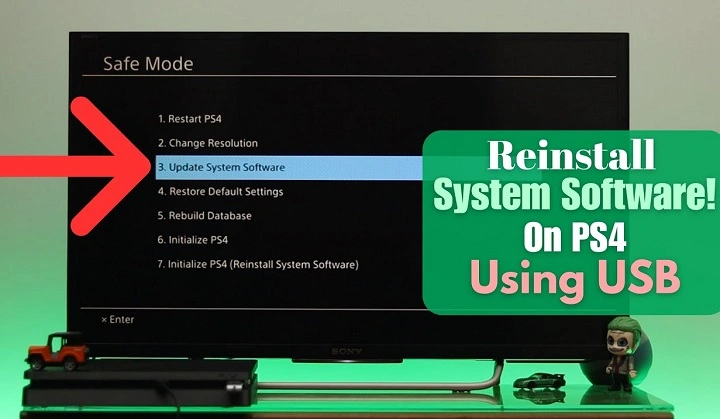
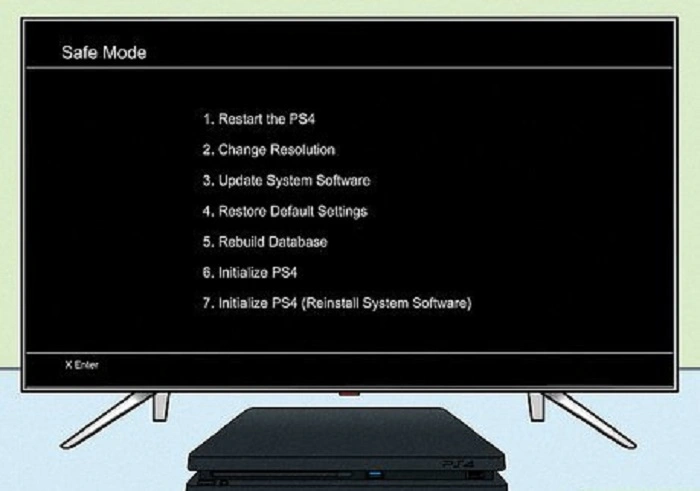
In Safe Mode, you see options. Some reset stuff. Some rebuild. Some updates. You want to “Initialize PS4 (Reinstall System Software).” This one wipes everything. Installs a fresh system from USB.
Don’t pick “Update System Software.” Or just “Initialize PS4.” Wrong ones. Only the reinstall option works.
Step by Step Reinstall Process
Put USB on the PS4. Enter Safe Mode. Pick “Initialize PS4 (Reinstall System Software).” Say yes. PS4 looks for the file. Check it out. If it’s good, start installing.
Takes 20 to 40 minutes. PS4 restarts a few times. Don’t turn it off. Don’t unplug. That makes things worse.
Done? PS4 restarts. Shows setup screen. Like brand new.
Common Errors and How to Fix Them
PS4 says no file found? Check USB format. Folder names. File name. Usually it’s the wrong caps. Or the wrong folder.
File corrupted message? Download again. Good internet helps. Don’t rename wrong. Safe Mode won’t open? Hold the button longer. Try a different outlet. Unplug everything but power.
Will Reinstalling Fix Every Problem?
Reinstalling fixes software stuff. Bad updates. Boot errors. Loops. Crashes. But not hardware problems.
Bad hard drive? Broken power supply? Too hot? Bad HDMI? Software won’t fix those. Need real repairs.
What to Do If Reinstalling Still Fails
Reinstall keeps failing? PS4 still dead? The hard drive might be bad. Good news. PS4 uses normal 2.5 inch drives. You can swap it. New drive, same USB method. Many “dead” PS4s come back this way.
Check power too. And cooling. Dust kills. Bad power kills. Clean vents. Use a surge protector. Helps a lot.
What Happens After Reinstalling
After reinstalling, the PS4 is fresh. Pick language. Region. Sign in to PSN. Download games again. Restore saves if you backed up. Cloud saves? Download those.
Takes time to set up. But it’s clean. Fast. Stable.
How to Avoid This Issue in the Future
Want to skip this mess? Let updates finish. Don’t unplug during updates. Keep space free. Shut down right. Don’t cut power. Clean dust. Use good power.
Small things. Big difference.
Reinstalling feels like giving up. But it saves PS4s that look dead. Losing data hurts. But working PS4? Worth it.
Go slow. Check each step. Double-check USB. If it works? You saved money. Saved your PS4. If not? You tried everything.
Sometimes your PS4 doesn’t need replacing. Just needs to start over.