


What is a Norton Antivirus Scam Email?
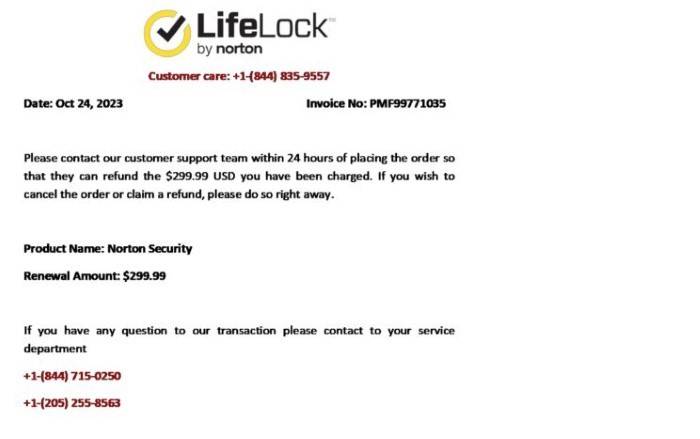
A Norton Antivirus scam email is a fraudulent message that pretends to be from Norton, a well-known cybersecurity company. The goal of these emails is to deceive recipients into providing personal information, clicking on malicious links, or downloading harmful attachments.
How to Identify a Norton Antivirus Scam Email
Identifying scam emails can be challenging, but there are several tell-tale signs to watch for:
Suspicious Sender Address
- Look closely at the sender’s email address: Scammers often use email addresses that look similar to Norton’s official address but have subtle differences.
- Domain mismatches: Official Norton emails will come from domains like “@norton.com” or “@symantec.com.” Be wary of any variations.
Urgent or Threatening Language
- Pressure to act quickly: Scam emails often create a sense of urgency, warning you that your account will be suspended or you will lose your subscription if you don’t act immediately.
- Threats of severe consequences: Be cautious if the email uses threatening language about your security or data.
Unfamiliar Links and Attachments
- Hover over links: Without clicking, hover over links to see if they lead to a legitimate Norton website. Scammers often use URLs that look convincing at first glance.
- Avoid downloading attachments: Unless you are certain the email is legitimate, do not download any attachments as they could contain malware.
Poor Grammar and Spelling
- Check for mistakes: Scam emails frequently contain grammatical errors, spelling mistakes, and awkward phrasing. Official emails from Norton are usually well-written and professional.
Common Tactics Used in Norton Antivirus Scam Emails
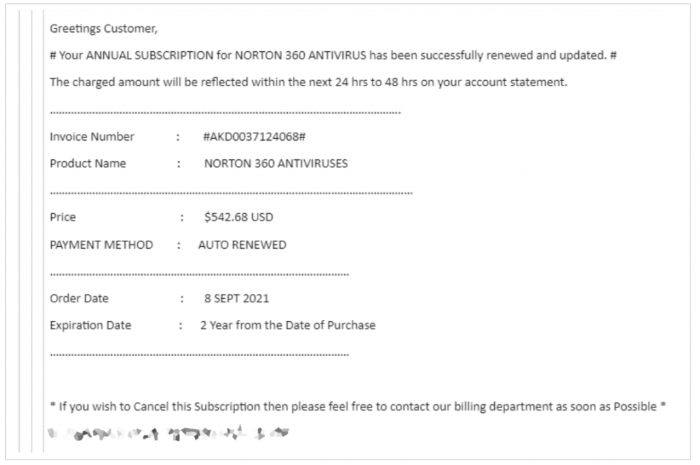
Scammers employ various tactics to make their emails look convincing. Here are some common ones:
Spoofed Email Addresses
Scammers use email addresses that appear to come from Norton. These addresses may look official but have minor variations, such as additional characters or misspellings.
Fake Subscription Renewal Notices
Emails might claim that your Norton subscription is expiring and prompt you to renew immediately. They often provide fake renewal links that lead to phishing websites.
Fraudulent Account Alerts
Scammers might send fake alerts claiming there has been suspicious activity on your Norton account. They ask you to verify your account details through a provided link.
Phishing Links and Malware Attachments
Emails might contain links to phishing sites designed to steal your login credentials or personal information. They may also include attachments infected with malware.
How to Protect Yourself from Norton Antivirus Scam Emails
Protecting yourself from scam emails requires vigilance and proactive steps. Here’s what you can do:
Verify Email Authenticity
- Check the sender’s email address: Ensure it matches official Norton addresses.
- Visit Norton’s official website: Manually type in the URL to verify any claims made in the email.
Enable Email Security Features
- Use spam filters: Most email services have spam filters that can catch fraudulent emails.
- Enable two-factor authentication (2FA): This adds an extra layer of security to your accounts.
Stay Informed
- Educate yourself about common scams: Being aware of the latest scam tactics can help you recognize them.
- Subscribe to Norton’s updates: Norton often provides information on recent scams and security threats.
Report Suspicious Emails
- Report to Norton: If you receive a suspicious email, report it to Norton’s security team.
- Mark as spam: Use your email service’s spam reporting feature to help filter out similar emails in the future.
What to Do If You Have Fallen for a Norton Antivirus Scam Email
If you suspect you have fallen victim to a scam email, take immediate action:
Change Your Passwords
- Update passwords: Change your passwords for any accounts that may have been compromised.
- Use strong, unique passwords: Consider using a password manager to generate and store secure passwords.
Contact Your Bank
- Monitor your accounts: Check your bank and credit card statements for unauthorized transactions.
- Notify your bank: Inform them of the potential fraud so they can take appropriate measures.
Scan Your Device
- Run a full system scan: Use your antivirus software to check for malware.
- Remove any threats: Follow the software’s instructions to eliminate any detected malware.
Report the Scam
- Notify Norton: Let Norton know about the scam so they can take action and warn others.
- Report to authorities: Consider reporting the scam to your local cybersecurity authorities or consumer protection agencies.
Norton Antivirus scam emails are a serious threat, but by staying vigilant and informed, you can protect yourself. Always verify the authenticity of emails claiming to be from Norton, enable security features, and educate yourself about common scams. If you do fall victim, take immediate steps to secure your accounts and report the scam. By following these guidelines, you can minimize the risk and safeguard your personal information.