


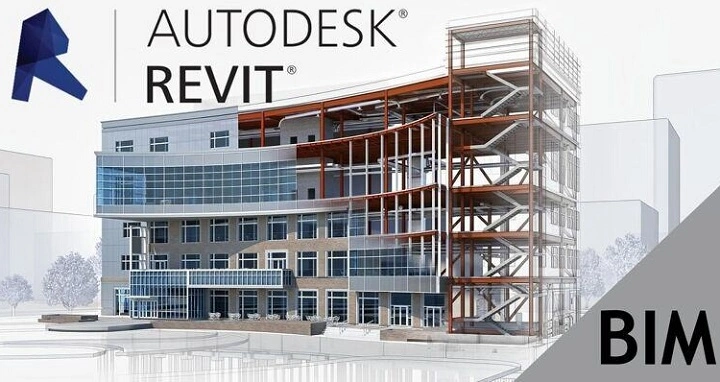
Work with buildings long? You’ll hear one word a lot. Revit. Architects love it. Engineers need it. Builders ask for Revit files. Jobs want you to know it. But what is it? Like, really?
Revit isn’t just a drawing tool. Nope. It’s not a fancy old program either. It’s a new way to think about buildings. Everything connects. Everything updates. When you change one thing? Boom. Everything else changes too. Get Revit? You get how we make buildings today.
What Is Revit Software?
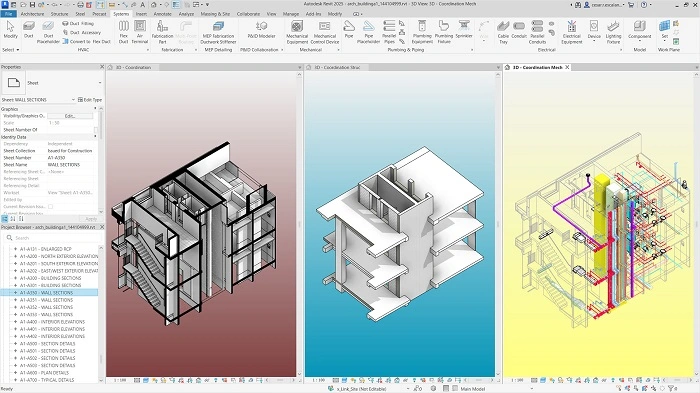
Revit is BIM software. BIM means Building Information Modeling (I’ll explain that next). You use it to design buildings. To plan them. To manage them too.
Here’s the cool part. You don’t draw lines for walls. Nope. In Revit, you place real walls. The wall knows it’s a wall. It knows how thick it is. How tall. What it’s made of. It knows the floors and roofs too.
This makes Revit super different. Everything connects in one big database. Change a wall? Your drawings update. Your schedules update. Everything updates. Like magic!
What Does BIM Mean in Simple Terms?
BIM means Building Information Modeling. Big words, right? Let me break it down.
BIM is making a digital building. But not just the shape. The data too.
In BIM:
- A door knows its size and price
- A wall knows what it’s made of
- A window knows where it goes
- A pipe knows how wide it is
Revit helps make these smart models. Teams can work together. They share one true model. No mix-ups!
Who Uses Revit Software?
Lots of people use Revit. Let me tell you who.
Architects use it to design buildings. They make floor plans. They keep everything matching up. Structural engineers? They use it for beams and columns. All the strong stuff. MEP engineers love it too. That’s the folks who do pipes and wires. Construction teams use Revit to see the design. To plan their work. Even building managers use it. Years after the building is done!
Everyone can work on the same project. At the same time. Pretty neat, right?
How Revit Software Works
Revit has one main model. Everything comes from this model.
When you make a floor plan? You’re looking at the model. Need a section view? Revit makes it from the model. Same model, different views.
Move a wall in one view? It moves everywhere. Change the window size? Your lists update too. No more fixing each drawing. Less mistakes!
Plus, many people can work together. Same project. Same time. Revit keeps track of who does what.
Key Features of Revit Software
Revit has lots of cool features. Let me show you the best ones.
First, there’s parametric modeling. Big word! It means things have rules. Change a rule? The model updates. Like, make a door wider? It knows to fit the new size.
Next is automatic coordination. Plans match sections. Sections match elevations. Everything stays in sync. No more “oops, forgot to update that drawing!”
You can see everything in 3D too. Spin it around. Look inside. It helps everyone understand better. Way better than flat drawings.
Revit makes schedules from the model. Door counts. Window lists. Material amounts. All automatic. Super helpful for costs and planning.
Teams can share models too. Link files together. Track changes. Work smooth as butter.
Revit vs Traditional CAD Software
People ask me: “How’s Revit different from CAD?” Big difference!
CAD is about drawing. You draw lines. Circles. Shapes that look like walls. Each drawing stands alone. Change one? You gotta change the rest by hand.
Revit is about modeling. You build the actual building. Digital version, but still. All views connect. Change happens everywhere at once.
Think of it this way:
CAD describes a building.
Revit builds a building (digitally).
That’s why Revit is taking over!
Benefits of Using Revit Software
Why use Revit? So many reasons!
Teams work better together. Everyone sees the same thing. Less “Wait, which drawing is right?”
Changes are easier. Move a door? Everything updates. No more fixing 20 drawings.
People understand better with 3D. Clients get it. Contractors get it. No more head scratching.
You can find problems early. Like when a pipe hits a beam. Oops! Fix it before building. Saves money. Saves time.
Drawings come from the model. More accurate. Less human error. Everyone’s happy!
Revit for Architecture
Architects love Revit. They start with basic shapes. Play with ideas. Test layouts.
As they work, they add more detail. Materials. Windows. All the pretty stuff. Same model from start to finish. No starting over!
Want to try different designs? Revit lets you. Make options. Compare them. Pick the best one. Easy!
Revit for Structural Engineering
Engineers who do structure stuff? They need Revit too.
They model all the strong parts. Beams, columns, slabs and foundations. Each piece knows its job, knows how strong it is.
These models can be tested. Are they strong enough? Will they work? Plus, they match up with the architect’s work. No surprises!
Revit for MEP Engineering
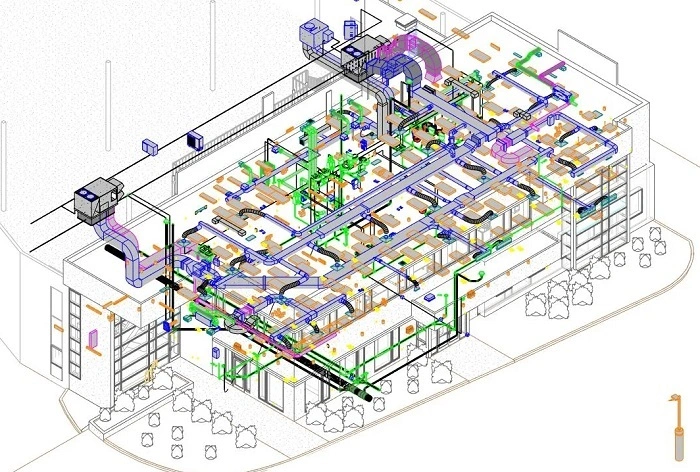
MEP is where Revit really shines. That’s all the system’s stuff. Air ducts. Water pipes. Electric wires.
Engineers model every pipe. Every duct. Every wire. The computer knows how they connect. Where they go. Super smart!
This stops crashes. You know, when a pipe wants to go through a beam? Revit finds these problems. Fix them on screen, not on site!
Revit in Construction and Project Coordination
Builders use Revit to see what’s coming. They understand the building before digging starts.
They can plan better. What goes first? What comes next? They can count materials from the model. Order the right amount. No waste!
When does everyone use the same model? Fewer surprises. Smoother building. Happy builders!
Revit for Facility Management
The building’s done. Now what? Revit still helps!
Building managers use the model. They find info about equipment. About rooms. About systems. Need to fix something? The model shows where it is. What type it is.
Planning renovations? The model helps. This long-term value? That’s why BIM keeps growing.
Limitations and Challenges of Revit Software
Revit’s great, but not perfect. Let’s be real.
It’s hard to learn. Especially if you know CAD. BIM thinking takes time. Lots of time.
You need a strong computer. Big models? They can get slow. Really slow. Frustrating!
Teams need rules. Good habits. Otherwise? The model gets messy. Then nobody’s happy.
It costs money too. Not cheap for small firms. Or individuals.
But still, most people say it’s worth it.
Learning Revit: What to Expect
Want to learn Revit? Here’s what happens.
You learn the software first. Click this. Do that. But that’s not enough. You gotta think BIM too. How things connect. How they relate.
Start simple. Basic models. Simple views. Basic documents. Then get fancy. Families (that’s Revit parts). Worksharing. Team stuff.
Practice helps most. Real projects teach you fast.
Why Revit Skills Are in High Demand
Jobs want Revit people. Many firms require it now. BIM is the norm in lots of places.
Know Revit? You work better with teams. You deliver faster. You fit modern workflows.
Students, listen up! Learn Revit. It opens doors. Architecture doors. Engineering doors. Construction doors. All the doors!
Revit and the Future of Building Design
Buildings keep getting smarter. More data. More connections. Revit leads to this change.
Models connect to analysis tools now. To automation. To digital twins (that’s a virtual copy of the real building). Buildings get smarter from design to use.
Learn Revit today? You’re ready for tomorrow. Smart move!
Final Thoughts
Revit’s more than software. Way more. It’s how we create building info. How we manage it. How we share it. Through the whole project!
Smart models beat dumb drawings. Teams coordinate better. Less errors. Better talking. Sure, Revit takes time to learn. But it makes everything better. More accurate. More teamwork.
Work with buildings? Design them? Build them? Then you need to know Revit. Not optional anymore. It’s how we build today. And tomorrow too!